Upload your entries for the Photo Competition
The AWNA’s Photo Competition is now ready for your submissions.
The entry eligibility is January 1, 2019 to December 31, 2019. The entry deadline is 10 pm January 31, 2020
Details are available in the awards section of the AWNA web site
or for complete description of categories and instructions on how to enter download this instruction PDF
PhotoAwardsHandout
You will find: How to enter online and uploading tips; categories and descriptions.
Please note:
- Everyone’s password on the competition site is reset to “bnc” at the start of every new competition
- All photographs must have been published and must have been taken between January 1, 2019 and December 31, 2019.
- You may enter up to two (2) photos per category
- SAIT arranged for the judging for 2019 competition
- Awards presented at the BNC Awards Banquet.
——-
How to enter:
We are again using the system hosted by SmallTownNewspapers.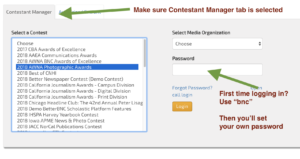

- Go to betternewspapercontest.com
- Click on “Contestant Login”and then Contestant Manager (on by default)
- Select the appropriate contest (ie. 2019 AWNA Photographic Awards) from the Contest menu on the left side of the screen
- Select your newspaper from the Media Organization drop down menu on the right side of the screen
- Enter your password
- If this is your first time here, enter the temporary password ‘bnc‘ (you will then be asked to choose your own password, for account security) PLEASE check ALL the data here – pay special attention to your EMAIL ADDRESS
NOTE: When you have submitted your second entry, the system will send you an email with a confirmation link. You’ll need to click this link to continue. Please be sure you enter a valid email. - If you have logged in previously, enter the password you chose for yourself.
- If this is your first time here, enter the temporary password ‘bnc‘ (you will then be asked to choose your own password, for account security) PLEASE check ALL the data here – pay special attention to your EMAIL ADDRESS
Looking for your Validation Email? Check your junk mail folder. The message is generic and contains a link; some mail servers filter this out as junk mail.
When you are logged in and viewing your ‘Dashboard’ you can see from here the entries and info you have submitted so far.
To ADD an entry:
- Select “Submit Entry”
- Choose a category and fill in the appropriate fields. You must include the date when this photo ran
- In the section marked “Upload Attachment” click Browse to upload your entry
- Continue to fill in appropriate fields
- Click Submit to complete your entry submission
To EDIT entries already submitted:
- If you had navigated away from your dashboard screen, hover mouse over “My Contest” (upper left), and select “Manage Entries”
- Listed on your dashboard will be each Entry that has been uploaded so far. Choose the appropriate “Action” shown the far right side of each entry
To change your account info (contact info, etc.):
- Hover mouse over “My Contest” (upper left), and select “My Account”
- Change the appropriate information
If you have questions about how to use the system, or can’t remember what you set as your password, please contact us at the AWNA, not the contest website company itself.
And remember, each time we set up a contest using this system the passwords are all reset to “bnc“. You’ll be asked to change that to something else immediately on your first log in.